Use Case One: Disaster
The best way to get started is jump straight in to a Project Hadron pipeline, giving context to the purpose of the package. We are going to work through preprocessing followed by model predict, then wrap the capabilities as a pipeline recipe that defines our microservice.
uc1: Business Objective
Survival Prediction
Predict if a passenger is likely to survive.
For our use case we are going to use the trusted and familiar Titanic dataset. It is a classic example of a classification model, and uses each of Project Hadron’s capabilities to pre-process the data.
Setup uc1
Initially import our capability classes, and then any environment variables required. In this case we are dynamically annotating for the input of the raw data location and the output of the model prediction.
import os
from ds_capability import FeatureSelect, FeatureEngineer,
from ds_capability import FeatureTransform, FeaturePredict, Controller
os.environ['HADRON_PREDICT_SOURCE_DATA'] = 'https://raw.githubusercontent.com/project-hadron/hadron-asset-bank/master/datasets/toy_sample/titanic.csv'
os.environ['HADRON_PREDICT_PERSIST_DATA'] = './hadron/data/hadron_docs_titanic_predict.parquet'
uc1: Exploratory Data Analysis
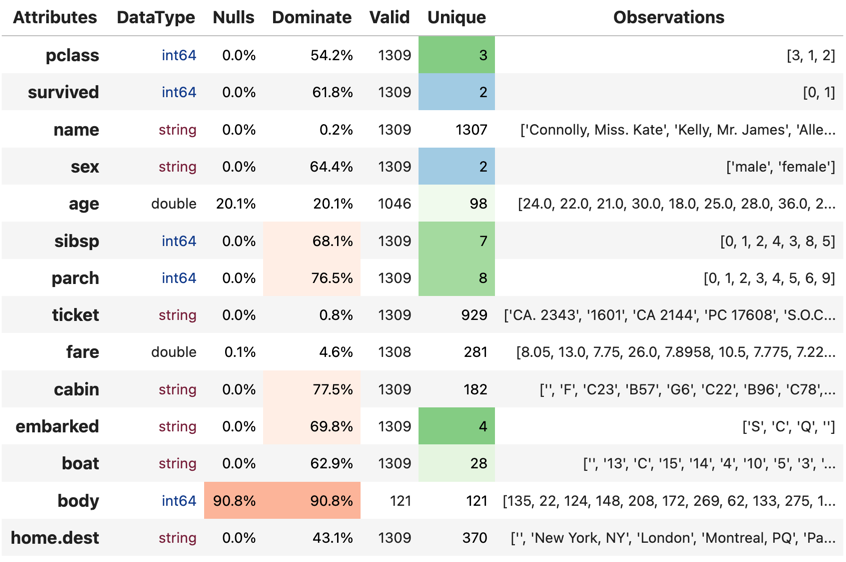
With any preprocessing, the initial stages are to do exploratory data analysis, but this is outside the scope of this lesson and as such is briefly shown as one of the pre-processing reports on data profiling. This gives us a view of the attributes, the data quality and observations of its content.
uc1: Preprocessing
In our preprocessing we are going to use FeatureSelect to remove columns of no interest, use FeatureEngineer to impute missing data, and FeatureTransition to encode categorical.
Selection uc1
Common across all capabilities, we initialize our component and use the factory class method from_env to create an instance of our FeatureSelect. The method call looks to the environment to reference any global variables, in this case HADRON_PREDICT_SOURCE_DATA, which is a pointer to our raw data source.
In the third line we create a pointer to our persistent data, in this case an in-memory event store, and finally load the data as our canonical, a PyArrow Table.
fs = FeatureSelect.from_env('survived', has_contract=False)
fs.set_source_uri('${HADRON_PREDICT_SOURCE_DATA}')
fs.set_persist_uri('event://select')
tbl = fs.load_source_canonical()
Before we start processing our data, the data contains the survival labels used to train the data. This will not be in our production data and as such not preprocessed so we need to set it aside for the model classification.
Beyond our source and persist pointers we can also create named pointer using add_connector_uri, extract the survived column and save it to the connector uri. In the second line we use auto_drop_columns with the drop=True. This reverses the effect of the call and drops everything except the survived column returning only this column, which we save (in the next line)
fs.add_connector_uri('label', uri='event://label')
label = fs.tools.auto_drop_columns(tbl, headers=['survived'], drop=True)
fs.save_canonical('label', label)
Using the same method we now drop all unwanted columns and return our new reduced canonical.
tbl = fs.tools.auto_drop_columns(tbl, headers=['name', 'boat', 'body', 'home.dest', 'ticket', 'survived'])
Finally we run the capability pipeline to ensure everything works.
fs.run_component_pipeline()
Engineering uc1
Now our dataset is more focussed on the features of interest we can start engineering those features to tidy them up. In our case, to impute missing data.
As before, we initialize our component and use the factory class method from_env to create an instance of our FeatureEngineer. We create pointers to our source, being a pointer to our previous FeatureSelect capability output, and set the persist, then load the canonical.
fe = FeatureEngineer.from_env('survived', has_contract=False)

fe.set_source_uri('event://select')
fe.set_persist_uri('event://engineer')

tbl = fe.load_source_canonical()
With this capability, the order in which we run each action can matter and using the same action twice will overwrite the first. Because of this in each method call we use the parameter intent_order=-1 where each action intent is given an order. The -1 indicates the next available slot so actions are executed in order they are given.
extract cabin features
From our EDA we see cabin is a compound value of cabin level and cabin number. Extracting these as discrete values gives us more manageable categories.
tbl = fe.tools.correlate_on_pandas(tbl, header='cabin',
                                code_str="apply(lambda x: x[0] if isinstance(x, str) and len(x) > 0 else None)",
                                to_header='cabin_level', intent_order=-1)
tbl = fe.tools.correlate_on_pandas(tbl, header='cabin',
                                code_str="str.extract('([0-9]+)').astype('float')",
                                to_header='cabin', intent_order=-1)
missing data imputation
Next we consider missing data taking the best strategies for the amount of data missing.
tbl = fe.tools.correlate_missing(tbl, header='fare', strategy='mean', intent_order=-1)
tbl = fe.tools.correlate_missing(tbl, header='age', strategy='constant', constant=-1, intent_order=-1)
tbl = fe.tools.correlate_missing(tbl, header='cabin', strategy='constant', constant=-1, intent_order=-1)

tbl = fe.tools.correlate_missing_probability(tbl, header='cabin_level', intent_order=-1)
Finally we run the capability pipeline to ensure everything works.
fe.run_component_pipeline()
Transformation uc1
FeatureTransition capability provides scaling, discretion and, for us, encoding but as before we initialize our component and use the factory class method from_env to create an instance of our class. We create pointers to our source, being a pointer to our previous FeatureEngineer capability output, and set the persist, then load the canonical.
ft = FeatureTransform.from_env('survived', has_contract=False)

ft.set_source_uri('event://engineer')
ft.set_persist_uri('event://transform')

tbl = ft.load_source_canonical()
As our potential model requires numeric values only we need to encode our remaining three categories.
# rare label encoding
tbl = ft.tools.encode_category_integer(tbl, headers=['cabin_level'], label_count=6, intent_order=-1)

# ordinal
tbl = ft.tools.encode_category_integer(tbl, headers=['sex', 'embarked'], ordinal=True, intent_order=-1)
As before, we run the capability pipeline to ensure everything works.
ft.run_component_pipeline()
With the completion of the preprocessing, we load te final feature set from the final capability of the pipeline of capabilities and see how it looks.
ft.canonical_report(ft.load_persist_canonical())
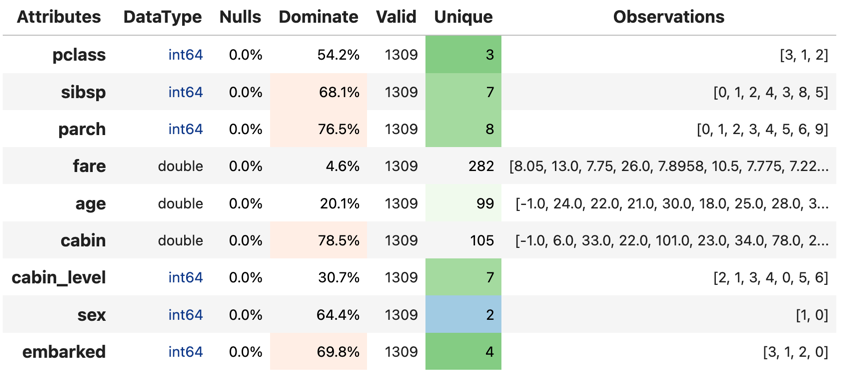
We ensure our feature set looks how we want it and our features are optimised. Once happy we can move on to model optimisation.
uc1: Model Discovery
This is a model discovery train and test process optimising a chosen models metadata to produce a trained model class.
The labels can be retrieved loading the data from where it was saved. An example using Project Hadron
a = FeaturePredict.from_memory()
# set the pointers
a.set_source_uri('event://transform')
a.add_connector_uri('label', 'event://label')
# load the data
tbl = a.load_source_canonical()
label = a.load_canonical('label')
# convert tp numpy arrays
X = np.asarray(tbl)
y = np.asarray(label)
Once the model is selected, optimised, trained and tested it is ready to predict. At this point we pass the trained model to our FeaturePredict capability.
uc1: Classifier Predict
At this point we have our preprocessed feature set and our trained model through discovers. We can now set up our model predict against new feature sets coming through the pipeline.
As with or previous capabilities, we initialize our component and use the factory class method from_env to create an instance of our FeaturePredict. We create pointers to our source, being a pointer to our previous FeaturePredict capability output, and set the persist, then load the feature set to be predicted.
# reset the connectors
aml.set_source_uri('event://transform')
# aml.set_persist_uri('event://predict')
aml.set_persist_uri('${HADRON_PREDICT_PERSIST_DATA}')

tbl = aml.load_source_canonical()
taking the instance of our model class, we give it a name, so we can retrieve the model for later interrogation if required, then pass in the trained model instance.
aml.add_trained_model(model_name='GradientBoost', trained_model=model)
With our model stored, we can now add our action to run our canonical against the model and return its predictions.
predict = aml.tools.label_predict(tbl, model_name='GradientBoost')
As with the other components, we run the capability pipeline to ensure everything works.
aml.run_component_pipeline()
uc1: Controller
As with or previous capabilities, we initialize our component and use the factory class method from_env to create an instance of our Controller, but this time we don’t need to give it a name as it is assumed there will only ever be one controller in each project Hadron pipeline. We also don’t need source and persist as the pipeline capabilities already have this.
ctrl = Controller.from_env(has_contract=False)
Once created we simply then register each of the pipeline components referenced by name. With the Controller recipe complete the project Hadron pipeline is ready to run.
ctrl.register.feature_select('survived')
ctrl.register.feature_engineer('survived')
ctrl.register.feature_transform('survived')
ctrl.register.feature_predict('survived')
To run the pipeline will run the Controller instance using the method call run_controller, which will run the our end-to-end pipeline from raw data to our modules prediction.
ctrl.run_controller()
Review Run uc1
We can review our results by loading the FeaturePredict output canonical.
FeaturePredict.from_env('survived').load_persist_canonical()
pyarrow.Table
predict: int64
----
predict: [[1,1,1,0,1,...,0,1,0,0,0]]
uc1: Summary
At this point we have
Performed Exploratory Data Analysis(EDA) to gain more clear insights of the data.
Completed Data Preprocessing to produce a set of capability recipes to optimize the features of interest to a model algorithm.
Build, train and train a model to select the best performing for our requirements.
Save the trained model for prediction retrieval in our FeaturePredict capability.
Make Predictions using our model and the testing data set
Created a capability pipeline of our preprocessing and model predict.
The next step will be to run the re-usable project Hadron pipeline with representative synthetic data.